Cài đặt Breeze TTS 2 trên Windows bằng Conda
Giới thiệu
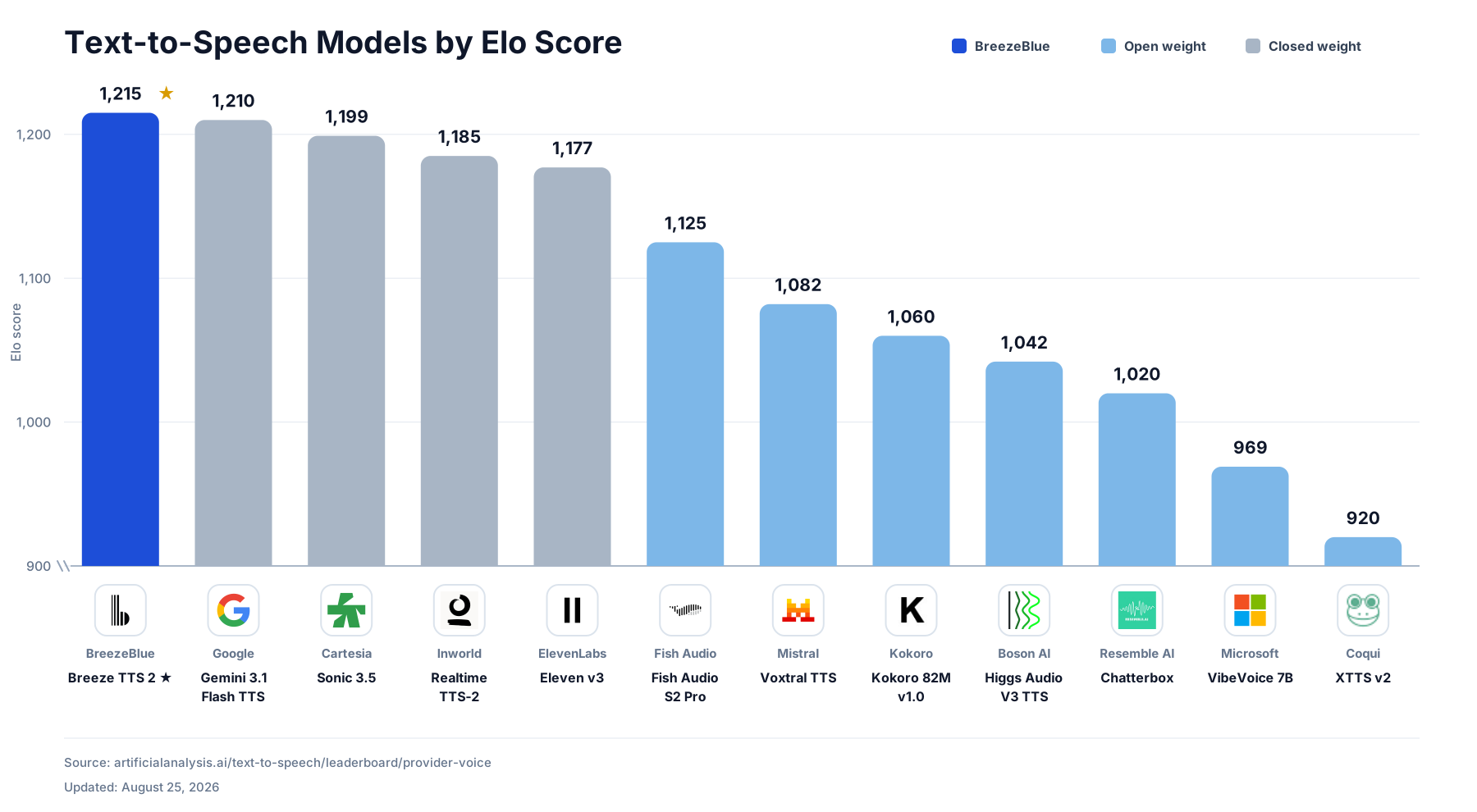
Breeze TTS 2 là một mô hình chuyển văn bản thành giọng nói (text-to-speech) có phạm vi xử lý mở, được xây dựng cho tương tác thời gian thực. Nó đứng đầu trong số các mô hình có phạm vi xử lý mở trên bảng xếp hạng TTS của Artificial Analysis, đồng thời vượt trội hơn các hệ thống độc quyền tiên tiến. Khả năng tuân theo hướng dẫn ngôn ngữ tự nhiên không giới hạn của nó hỗ trợ thiết kế giọng nói không cần tham chiếu và điều khiển giọng nói dựa trên tham chiếu, trong khi khả năng truyền phát độ trễ cực thấp cho phép tương tác nhanh nhạy và biểu cảm.
GitHub: https://github.com/breezeblue-ai/breeze-tts
Hugging Face: https://hf.co/BreezeBlue/Breeze-TTS-2
Website: https://breezeblue.ai
Yêu cầu hệ thống
- Hệ điều hành: Windows 10/11 (64-bit), macOS hoặc Linux (Debian/Ubuntu).
- Python: Yêu cầu phiên bản >= 3.10
- Dung lượng ổ cứng: Khuyến nghị 10GB trở lên (cho các thư viện phụ thuộc và bộ nhớ cache mô hình). Ít nhất 400 MB cho Miniconda; 3 GB trở lên cho Anaconda đầy đủ.
- GPU: là tùy chọn nhưng RẤT KHUYÊN DÙNG để tăng hiệu suất.
- Internet: Để tải xuống các thư viện phụ thuộc và mô hình từ Hugging Face Hub.
| Environment | Run this Command |
|---|---|
| CPU only | pip3 install torch torchvision |
| CUDA 11.8 | pip3 install torch torchvision torchaudio –index-url https://download.pytorch.org/whl/cu118 |
| CUDA 12.1 | pip3 install torch torchvision torchaudio –index-url https://download.pytorch.org/whl/cu121 |
| CUDA 12.6 | pip3 install torch torchvision torchaudio –index-url https://download.pytorch.org/whl/cu126 |
| CUDA 12.8 | pip3 install torch torchvision torchaudio –index-url https://download.pytorch.org/whl/cu128 |
| CUDA 13.0 | pip3 install torch torchvision torchaudio –index-url https://download.pytorch.org/whl/cu130 |
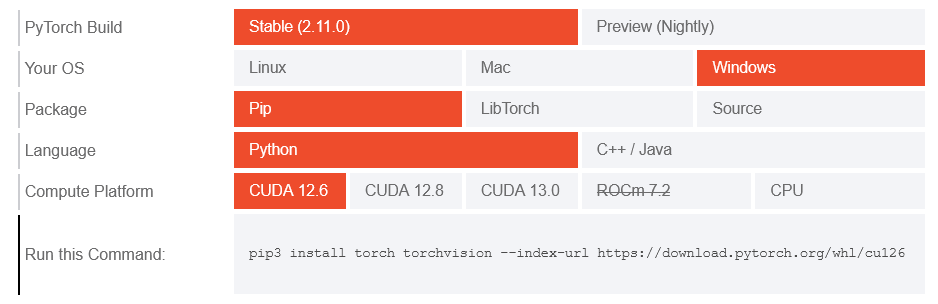
Lưu ý: Kiểm tra phiên bản CUDA bằng lệnh
nvidia-smi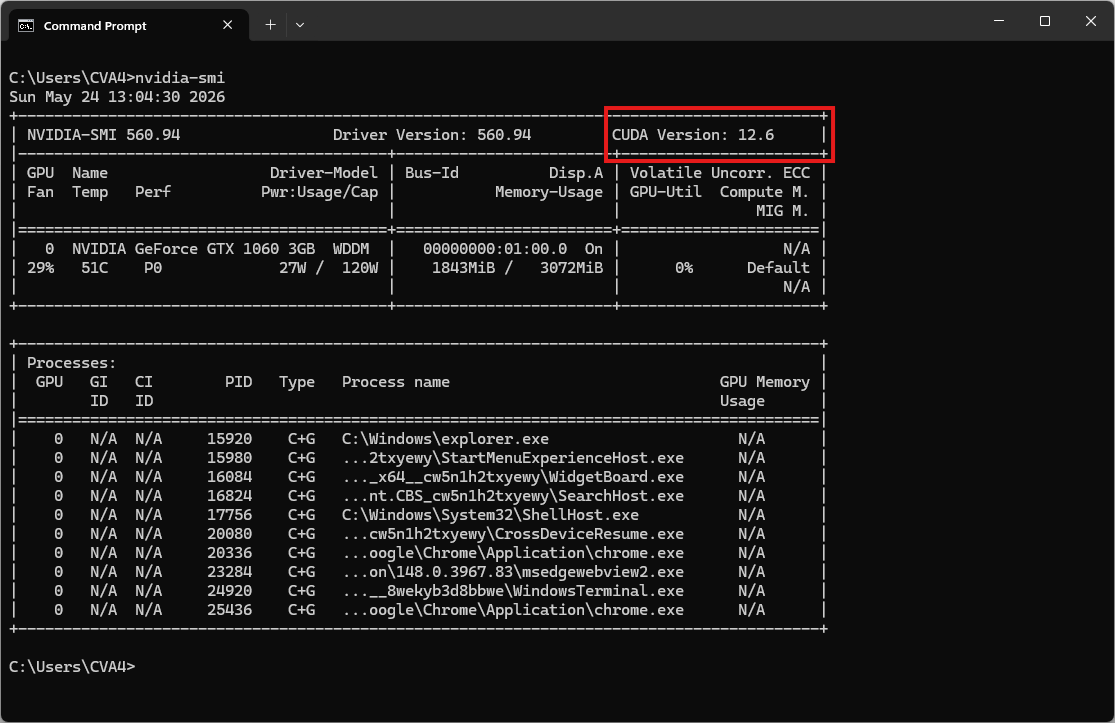
Video hướng dẫn
Sắp ra mắt!
Bước 1. Cài đặt Miniconda
Tải xuống Miniconda: https://www.anaconda.com/download/success?reg=skipped
Liên kết trực tiếp: https://anaconda.com/api/installers/Miniconda3-latest-Windows-x86_64.exe
Cài đặt Miniconda trên Windows
Bước 2. Tạo môi trường Conda
Tạo tệp environment.yml:
name: breezetts
channels:
  - conda-forge
  - defaults
dependencies:
  # Python version (requires >= 3.10)
  - python=3.10

  - pip
  - pip:
      # This is the PyTorch CUDA 12.6 wheels.
      - --extra-index-url https://download.pytorch.org/whl/cu126
      - torch
      - torchaudio

      # Install the dependencies for Breeze TTS 2
      - qwen-tts==0.1.1
      - transformers==4.57.3
      - numpy>=2.0
      - soundfile>=0.13
      - fastapi>=0.115
      - uvicorn>=0.30
      - python-multipart>=0.0.18
      - pytest>=8.0
      - ruff>=0.12

      # Download the model from Hugging Face / ModelScope
      - huggingface_hub
      - modelscope
Kích hoạt môi trường conda:
conda env create -f environment.yml
conda activate breezetts
Sao chép BreezeTTS từ github (chạy sau khi kích hoạt môi trường)
git clone https://github.com/breezeblue-ai/breeze-tts.git
cd breeze-tts
Tải xuống các trọng số
🤗 HuggingFace
hf download BreezeBlue/breeze-tts-2 --local-dir ..\breeze-tts-2🤖 ModelScope
# AuK-Base
modelscope download --model BreezeBlue/breeze-tts-2 --local_dir ..\breeze-tts-2
Tải xuống bản ghi âm tham khảo
curl -L -O "https://r.breeze.blue/blog/tts2/multilingual-en.mp3"Cấu trúc thư mục được mong đợi là:
breeze/
├── breeze-tts/
│   └── multilingual-en.mp3
├── breeze-tts-2/
└── environment.yml
Bước 3. Chạy suy luận
Bây giờ, hãy chạy tập lệnh ví dụ cơ bản để tổng hợp giọng nói:
python infer.py ../breeze-tts-2 --ref-audio multilingual-en.mp3 --ref-text "Every journey finds its meaning when someone dares to take the first step." --text "(sigh) It is good to hear your voice again after all this time." --output outputs/voice_clone_en.wavKết quả sẽ là tệp âm thanh voice_clone_en.wav
Streaming API
Khởi động API truyền phát dữ liệu đơn luồng. API này sử dụng cùng một môi trường chạy PyTorch và chế độ thực thi tức thời theo mặc định:
python -m breeze_infer.api ../breeze-tts-2 --host 0.0.0.0 --port 7860Gửi yêu cầu hướng dẫn bằng giọng nói kèm theo âm thanh tham khảo và CFG 4:
curl -X POST http://127.0.0.1:7860/v1/audio/speech \
  -F "cfg_scale=4" \
  -F "ref_audio=@reference.wav" \
  -F "ref_text=This is the exact transcript of the reference audio." \
  -F "text=(clears throat) We need to discuss what happened last night." \
  -F "instruction=Speak slowly with a restrained, serious tone." \
  -F "seed=42" \
  --output voice_direction.pcm
Phản hồi là tín hiệu PCM mono 24 kHz có dấu 16-bit little-endian. Khởi động API với tùy chọn này --fast-all để kích hoạt đường dẫn nhanh.
Tham khảo: