Cài đặt OPPO CuteTTS bằng Conda
Giới thiệu
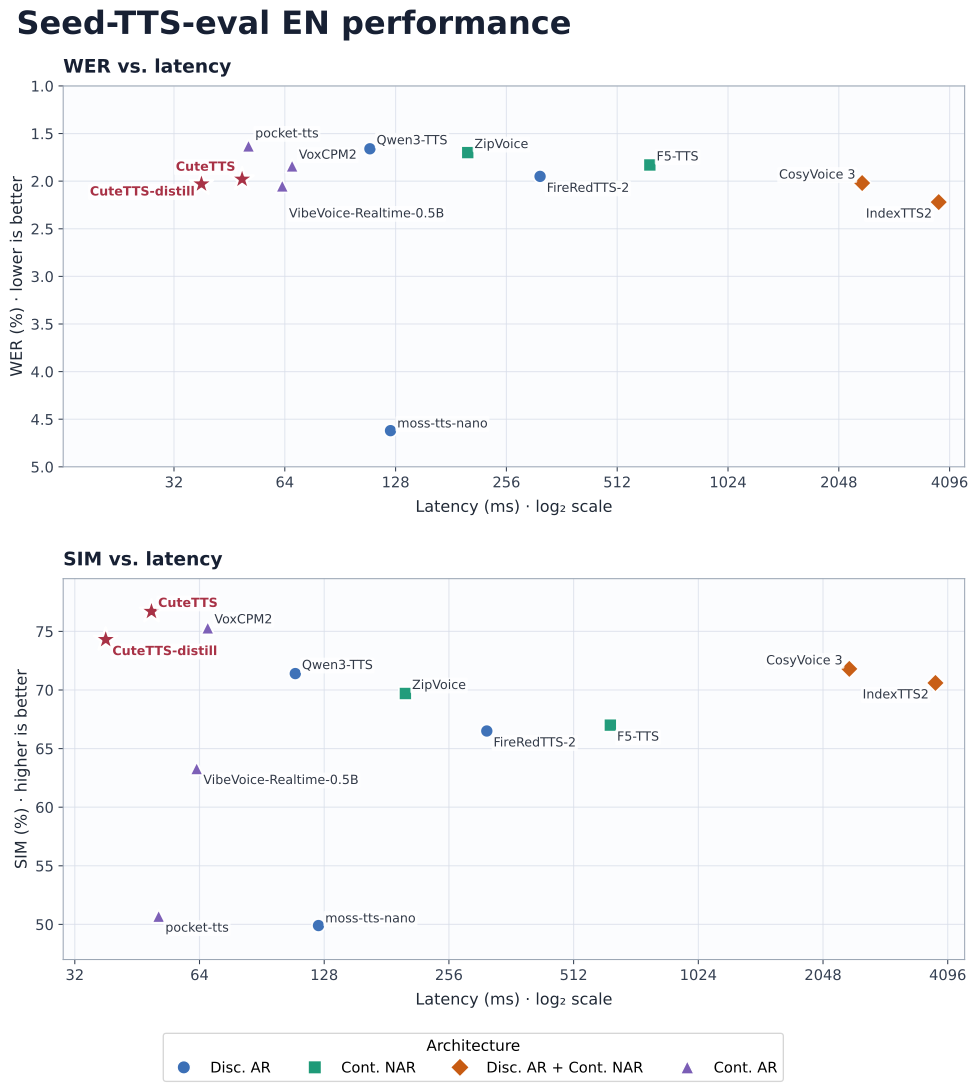
CuteTTS: một mô hình chuyển đổi văn bản thành giọng nói (TTS) tự hồi quy liên tục, có trọng lượng nhẹ và vận hành hiệu quả trên các nền tảng GPU, CPU cũng như chip Apple silicon.
GitHub: https://github.com/OPPO-Mente-Lab/CuteTTS
Hugging Face: https://hf.co/OPPOer/CuteTTS
Hugging Face: https://hf.co/OPPOer/CuteTTS-distill
Demo: https://hf.co/spaces/hugging-apps/cutetts-demo
Paper: https://arxiv.org/abs/2608.08638
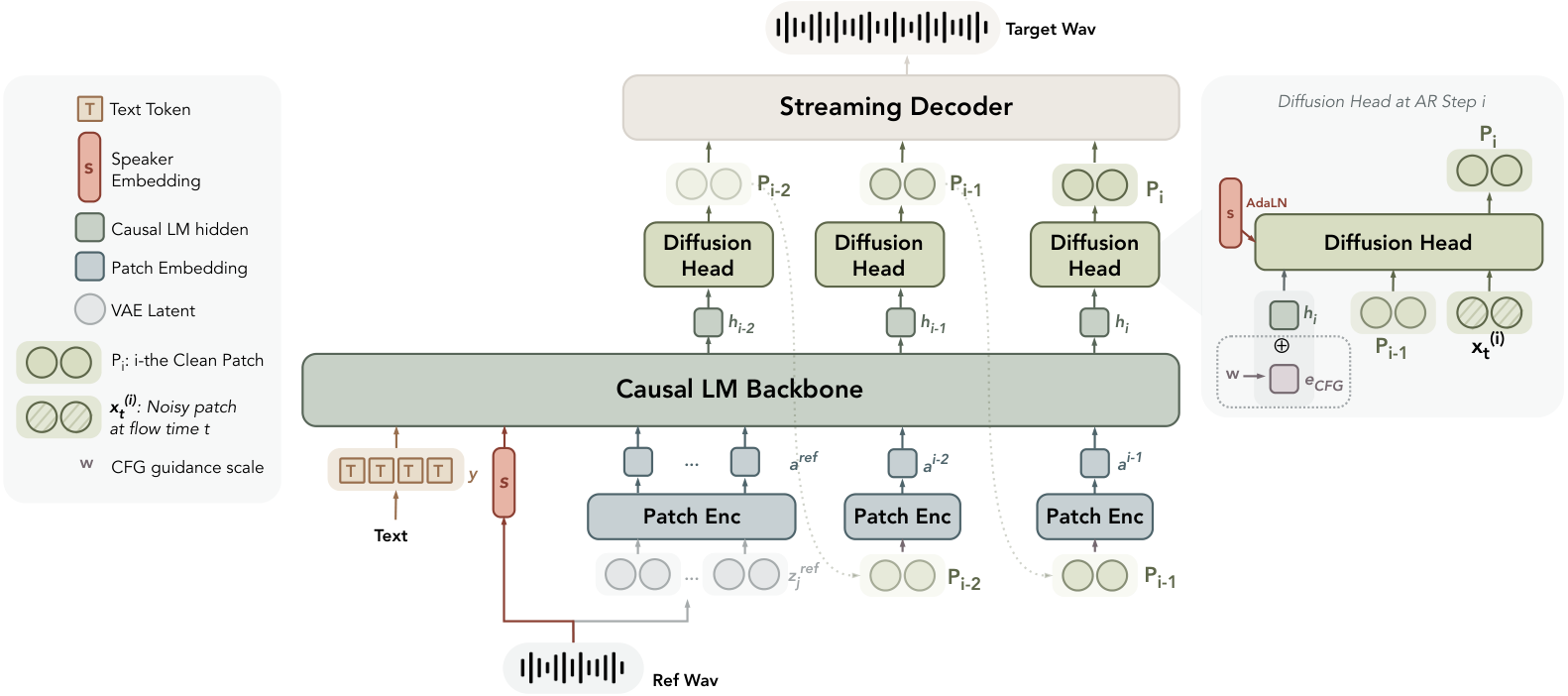
- Một mô hình chuyển văn bản thành giọng nói (TTS) tự hồi quy liên tục, có trọng lượng nhẹ (~230 triệu tham số), vận hành hiệu quả trên cả GPU, CPU và các dòng chip Apple silicon.
- Độ trễ cực thấp: chỉ mất khoảng
40 msđể tạo ra đoạn âm thanh đầu tiên, với tốc độ xử lý nhanh gấp khoảng 9 lần thời gian thực trên card đồ họa NVIDIA RTX 4090. - Chất lượng giọng nói vượt trội cùng khả năng sao chép giọng nói (voice cloning) ấn tượng.
- Cung cấp bản demo trên nền tảng web, API Python và giao diện dòng lệnh (CLI).
- Hỗ trợ đa ngôn ngữ: tiếng Anh, tiếng Trung, tiếng Pháp, tiếng Đức và tiếng Tây Ban Nha.
Yêu cầu hệ thống
- Hệ điều hành: Windows 10/11 (64-bit), macOS hoặc Linux (Debian/Ubuntu).
- Python: Yêu cầu phiên bản >= 3.10
- Dung lượng ổ cứng: Khuyến nghị 10GB trở lên (cho các thư viện phụ thuộc và bộ nhớ cache mô hình). Ít nhất 400 MB cho Miniconda; 3 GB trở lên cho Anaconda đầy đủ.
- GPU: là tùy chọn nhưng RẤT KHUYÊN DÙNG để tăng hiệu suất.
- Internet: Để tải xuống các thư viện phụ thuộc và mô hình từ Hugging Face Hub.
| Mức yêu cầu | CPU | RAM |
|---|---|---|
| Tối thiểu | Intel Core i3 hoặc AMD Ryzen 3 | 8 GB |
| Khuyến nghị | Intel Core i5 hoặc AMD Ryzen 5 | 16 GB |
| Hiệu năng cao | Intel Core i7/i9 hoặc AMD Ryzen 7/9 | 32 GB |
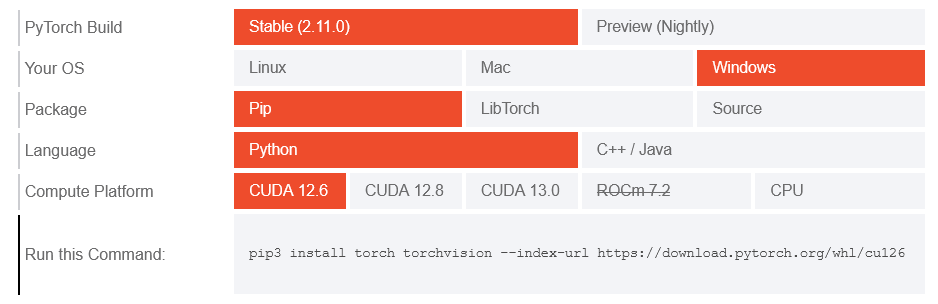
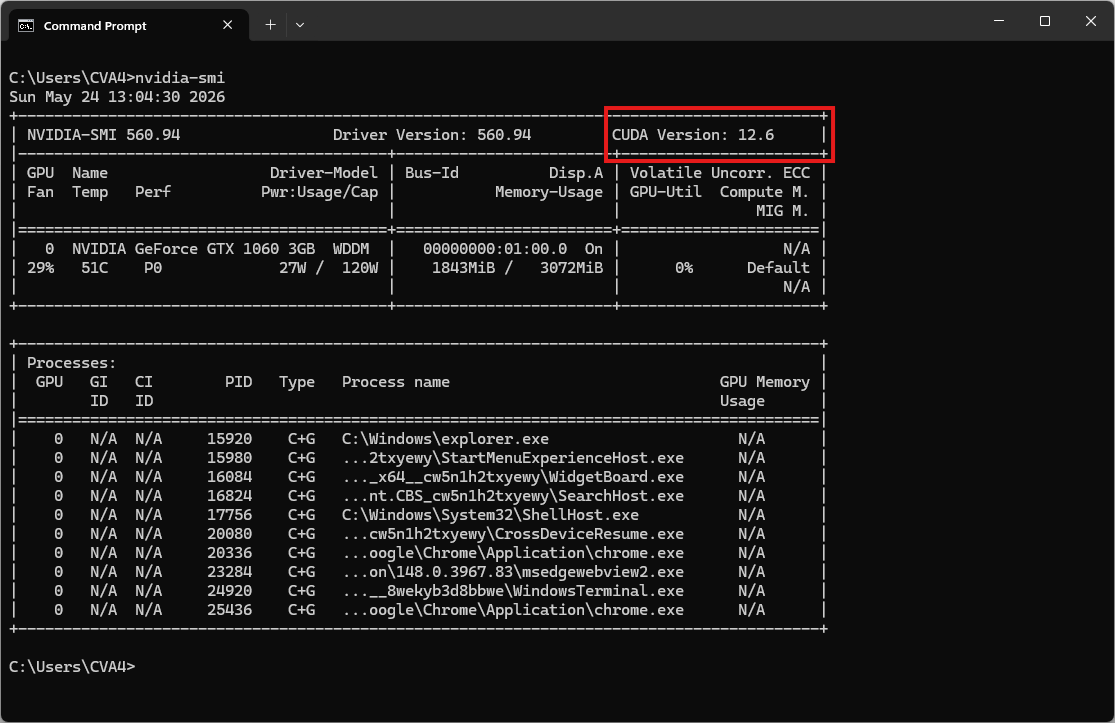
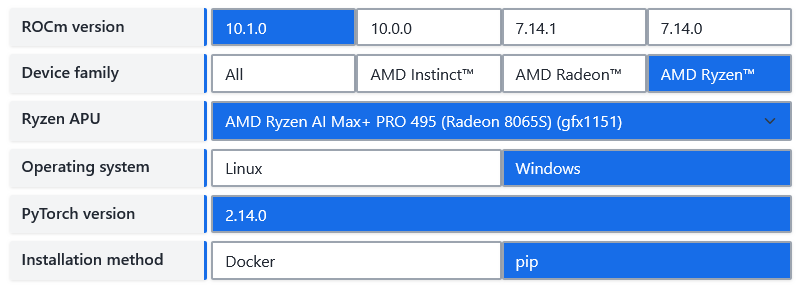
| Environment | Run this Command |
|---|---|
| CPU only | pip3 install torch torchvision |
| Apple Silicon | pip3 install torch torchvision |
| AMD ROCm | Install PyTorch for ROCm |
| CUDA 11.8 | pip3 install torch torchvision torchaudio --index-url https://download.pytorch.org/whl/cu118 |
| CUDA 12.1 | pip3 install torch torchvision torchaudio --index-url https://download.pytorch.org/whl/cu121 |
| CUDA 12.6 | pip3 install torch torchvision torchaudio --index-url https://download.pytorch.org/whl/cu126 |
| CUDA 12.8 | pip3 install torch torchvision torchaudio --index-url https://download.pytorch.org/whl/cu128 |
| CUDA 13.0 | pip3 install torch torchvision torchaudio --index-url https://download.pytorch.org/whl/cu130 |
Video hướng dẫn
Sắp ra mắt!
Bước 1. Cài đặt Miniconda
Tải xuống Miniconda: https://www.anaconda.com/download/success?reg=skipped
Liên kết trực tiếp: https://anaconda.com/api/installers/Miniconda3-latest-Windows-x86_64.exe
Liên kết trực tiếp: https://repo.anaconda.com/miniconda/Miniconda3-latest-Windows-arm64.exe
Cài đặt Miniconda trên Windows
Bước 2. Tạo môi trường Conda
Tạo tệp environment.yml:
name: cutetts
channels:
- conda-forge
- defaults

dependencies:
# Python version (requires >= 3.10)
- python=3.12

- pip
- pip:
    # PyTorch CPU only
    - torch
    - torchaudio

    # Install CuteTTS directly from GitHub.
    - git+https://github.com/OPPO-Mente-Lab/CuteTTS.git

    # Download the model from Hugging Face / ModelScope
- huggingface_hubKích hoạt môi trường conda:
conda env create -f environment.yml
conda activate cutetts
Clone và cài CuteTTS từ source (chạy sau khi kích hoạt môi trường)
git clone https://github.com/OPPO-Mente-Lab/CuteTTS.git
cd CuteTTS
Tải xuống các trọng số
Tải xuống CuteTTS hoặc CuteTTS-distill vào thư mục ./model:
# Tạo thư mục model (Windows tự động xử lý việc tạo thư mục cha)
mkdir model

# Tải model CuteTTS (hoặc CuteTTS-distill nếu máy yếu hơn)
hf download OPPOer/CuteTTS --local-dir ./model/CuteTTS
hf download OPPOer/CuteTTS-distill --local-dir ./model/CuteTTS-distill
Cấu trúc thư mục
Cấu trúc thư mục được mong đợi là:
D:\cute\
├── CuteTTS\
│   ├── assets\
│   ├── LICENSES\
│   ├── model\
│   │   ├── CuteTTS\
│   │   └── CuteTTS-distill\
│   ├── src\
│   │   └── cutetts\
│   ├── .gitignore
│   ├── LICENSE
│   ├── NOTICE
│   ├── README.md
│   ├── README_zh.md
│   ├── infer.py
│   └── pyproject.toml
├── cute_test.py
└── environment.yml
Bước 3. Chạy suy luận
CLI Inference
# sanity check
cutetts --help
usage: cutetts [-h] --model-dir MODEL_DIR --text TEXT [--mode {tts,voice_clone}] [--reference-audio REFERENCE_AUDIO] [--output OUTPUT] [--device DEVICE] [--cfg-strength CFG_STRENGTH]
[--diffusion-steps DIFFUSION_STEPS] [--diffusion-sway-coefficient DIFFUSION_SWAY_COEFFICIENT] [--max-decode-length MAX_DECODE_LENGTH] [--seed SEED] [--no-progress]
Generate speech with CuteTTS.
options:
-h, --help show this help message and exit
--model-dir MODEL_DIR
--text TEXT
--mode {tts,voice_clone}
--reference-audio REFERENCE_AUDIO
--output OUTPUT
--device DEVICE Inference device: auto, cuda, mps, or cpu (default: auto).
--cfg-strength CFG_STRENGTH
--diffusion-steps DIFFUSION_STEPS
--diffusion-sway-coefficient DIFFUSION_SWAY_COEFFICIENT
--max-decode-length MAX_DECODE_LENGTH
--seed SEED
--no-progressBây giờ, hãy chạy tập lệnh ví dụ cơ bản để tổng hợp giọng nói:
cutetts --model-dir ./model/CuteTTS --mode tts --text "The voice generated by this model sounds amazing!" --output tts.wavKết quả sẽ là tệp âm thanh tts.wav
Chạy thử sao chép giọng nói
cutetts --model-dir ./model/CuteTTS --mode voice_clone --reference-audio ./assets/default_reference.wav --text "The voice generated by this model sounds amazing!" --output clone.wavChạy suy luận bằng tệp Python
Tạo một tệp có tên cute_test.py:
from cutetts import CuteTTS
import soundfile as sf

model = CuteTTS.from_pretrained("./CuteTTS/model/CuteTTS", device="auto")
result = model.generate("The voice generated by this model sounds amazing!", mode="tts")
sf.write("tts.wav", result.waveform.squeeze(0).numpy(), result.sample_rate)

clone = model.generate(
    "The voice generated by this model sounds amazing!",
    mode="voice_clone",
    reference_audio="./CuteTTS/assets/default_reference.wav",
)
sf.write("clone.wav", clone.waveform.squeeze(0).numpy(), clone.sample_rate)
Chạy tập lệnh để sao chép giọng nói:
python cute_test.pyKết quả sẽ là tệp âm thanh out.wav
Khởi chạy giao diện Web
Sau khi cài đặt xong, bạn không cần viết code mà có thể bật ngay một giao diện Web UI cục bộ bằng lệnh:
cutetts-demo --model-dir ./model --device auto --host 127.0.0.1 --port 7860Mở trình duyệt và truy cập vào địa chỉ http://127.0.0.1:7860 để bắt đầu sử dụng. Hệ thống sẽ tự động tải các file Model (Trọng số cấu hình mã nguồn) từ HuggingFace trong lần đầu chạy.