Install VoxCPM2 TTS on Windows with Conda
Introduction
VoxCPM2 is a Tokenizer-Free TTS for Multilingual Speech Generation, Creative Voice Design, and True-to-Life Cloning.
GitHub: https://github.com/OpenBMB/VoxCPM
Hugging Face: https://hf.co/openbmb/VoxCPM2
Demo: https://hf.co/spaces/openbmb/VoxCPM-Demo
Docs: https://voxcpm.readthedocs.io/en/latest/
Audio Samples: https://openbmb.github.io/voxcpm2-demopage/
Prerequisites
System requirements:
- Operating System: Windows 10/11 (64-bit), macOS, or Linux (Debian/Ubuntu).
- Python: version >= 3.10 required
- Disk Space: 10GB+ recommended (for dependencies and model cache). At least 400 MB for Miniconda; 3 GB+ for full Anaconda.
- The GPU is optional but HIGHLY Recommended for Performance
- Internet: For downloading dependencies and models from Hugging Face Hub.
| Environment | Run this Command |
|---|---|
| CPU only | pip3 install torch torchvision |
| CUDA 11.8 | pip3 install torch torchvision torchaudio –index-url https://download.pytorch.org/whl/cu118 |
| CUDA 12.1 | pip3 install torch torchvision torchaudio –index-url https://download.pytorch.org/whl/cu121 |
| CUDA 12.6 | pip3 install torch torchvision torchaudio –index-url https://download.pytorch.org/whl/cu126 |
| CUDA 12.8 | pip3 install torch torchvision torchaudio –index-url https://download.pytorch.org/whl/cu128 |
| CUDA 13.0 | pip3 install torch torchvision torchaudio –index-url https://download.pytorch.org/whl/cu130 |
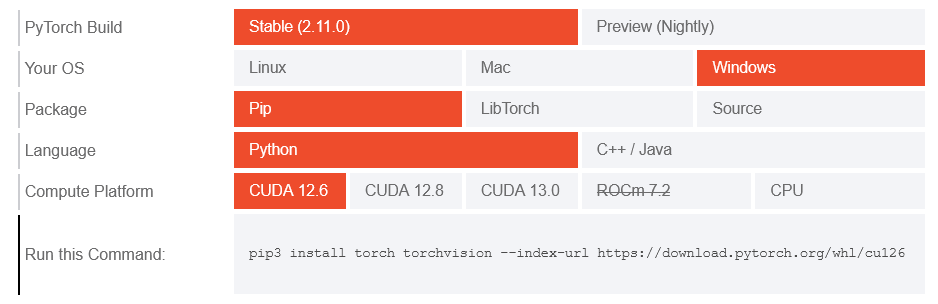
Note: CUDA version check by command
nvidia-smi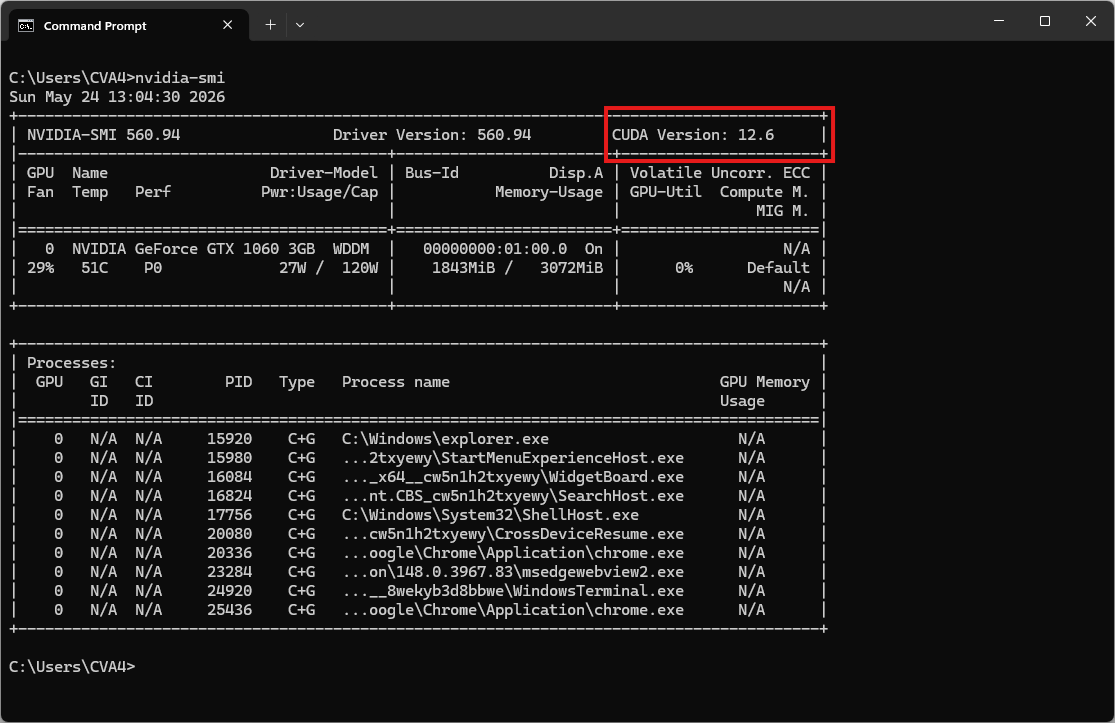
Video tutorial
Step 1. Install Miniconda Package
Download Miniconda: https://www.anaconda.com/download/success?reg=skipped
Direct link: https://anaconda.com/api/installers/Miniconda3-latest-Windows-x86_64.exe
How to Install Miniconda on Windows
Step 2. Create Conda Environment
Create a conda environment:
name: voxcpm
channels:
  - conda-forge
  - defaults
dependencies:
  # Python version >= 3.10 required
  - python=3.10

  # Install FFmpeg for torchaudio library
  - ffmpeg

  - pip
  - pip:
      # PyTorch CUDA 12.6 wheels
      # - --extra-index-url https://download.pytorch.org/whl/cu126
      # - torch
      # - torchaudio
      # - torchcodec

      # VoxCPM2: Tokenizer-Free TTS
      - voxcpm
Activate conda environment:
conda env create -f environment.yml
conda activate voxcpm
Step 3. Create a Python Script
Create a file named voxcpm_test.py:
from voxcpm import VoxCPM
import soundfile as sf

model = VoxCPM.from_pretrained(
  "openbmb/VoxCPM2",
  load_denoiser=False,
)

wav = model.generate(
    text="VoxCPM2 is the current recommended release for realistic multilingual speech synthesis.",
    cfg_value=2.0,
    inference_timesteps=10,
)
sf.write("demo.wav", wav, model.tts_model.sample_rate)
print("saved: demo.wav")
Run it:
python voxcpm_test.pyThe result will be the audio file demo.wav
Launch the local web UI
Try VoxCPM without coding:
python app.py --port 8808Open your browser and navigate to http://localhost:8808. The system will automatically download the required model weights from HuggingFace during this first run.
Note: You can download the app.py file here.